

Device fingerprinting is an advanced fraud detection method that identifies and tracks users based on the unique combination of their device. Instead of relying on cookies, IP addresses, or account credentials that fraudsters can easily fake or discard, device fingerprinting assesses hardware, software, and configuration settings.
Unlike cookies or IP addresses, the underlying device is much harder to change. This makes device fingerprinting a reliable signal for identifying suspicious activity and a critical layer of intelligence in modern fraud prevention.
In this guide, we’ll discuss what device fingerprinting is, how it works, and real-time use cases that banks and financial organisations can typically adapt and use those combined signals to prevent fraud.
Key Takeaways
-
Device fingerprinting combines hardware, software, browser and network signals into a persistent identifier, unlike cookies, which users can delete at will.
-
Device fingerprinting captures signals like screen resolution, GPU rendering, and timezone in milliseconds at login, signup, or checkout, letting fraud platforms flag risky activity in real time, before a transaction completes.
-
Three hash types, cookie hash, browser hash and device hash, work together to raise identification accuracy across sessions and channels.
-
Mobile fingerprints carry lower entropy than browser fingerprints, so mature systems, including Sign3's device intelligence layer, combine SDK signals with behavioural and network data.
What Is Device Fingerprinting?
Device fingerprinting is an advanced method of identifying and tracking a computer, smartphone, or tablet using a combination of attributes drawn from its hardware, operating system, browser configuration, and network behaviour. Unlike a username or an account number, a device fingerprint isn't issued to a user, but it's generated by combining these existing device attributes into a unique signature.
Device fingerprinting collects signals from certain characteristics that already exist within a system. These include screen resolution, installed fonts, GPU rendering behaviour, time zone, language settings, battery status, and dozens of other data points collected in milliseconds without notifying users.
When combined, these attributes form a unique signature that is difficult to replicate and fabricate. A fraud prevention platform captures this signature at the point of interaction. Whether that is a login attempt, a signup form, or a checkout page, device fingerprinting instantly triggers that activity, alerting banks and fintechs to take a preventive measure.
Because the process runs silently in the background, it adds no friction for genuine users while giving risk teams a persistent identifier that survives cookie deletion, private browsing, and app reinstalls far better than session-based tracking methods.
Types of Hash Layers Behind Device Fingerprinting
Most device fingerprinting systems create multiple fingerprint layers, each built from a different set of device attributes and designed to detect varying levels of device or browser changes.
1. Cookie Hash
This is the primary layer, built from values stored in browser cookies and local storage. It identifies a fraudulent session quickly but disappears the moment a user clears their browser data, switches to incognito mode, or deletes the app cache.
Fraud teams use those cookie hashes as a first-pass signal. Though these cookie hashes allow for maintaining continuity within a single browsing session, they are unreliable as a standalone fraud detection method.
2. Browser Hash
This layer focuses on the browser environment. It analyses canvas rendering behaviour, installed plugins, available fonts, screen settings, browser version, and language preferences to create a unique browser profile. Unlike cookies, this browser device fingerprint is not stored on the device. Instead, it is regenerated each time a user visits, which means clearing cookies does not remove it.
However, major browser updates, configuration changes, or switching to a different browser can alter the fingerprint. As a result, it is a valuable signal for device recognition but is not typically reliable enough to serve as a permanent fraud identifier on its own.
3. Device Hash
Device hash analyses hardware-level attributes such as GPU model, CPU characteristics, sensor calibration data, operating system build, and, on mobile, SDK-level signals that are far harder for an ordinary user or a fraudster to alter.
A device hash persists after browser changes, cache clearing, and even after some app reinstallation. Some risk teams refer to it as the device print, since it remains steady when the other two layers shift.
Device fingerprinting does not rely on a single hash type; rather, it blends all three, weighing each according to its persistence. It means a device that passes one layer still reflects inconsistencies against the other two. When a cookie hash resets but the browser and device hashes remain unchanged, the mismatch triggers a red flag. A legitimate user may clear cookies, but their browser and device signals typically stay consistent. Fraudsters trying to appear as new users often create gaps between these layers, making repeat fraud easier to detect.
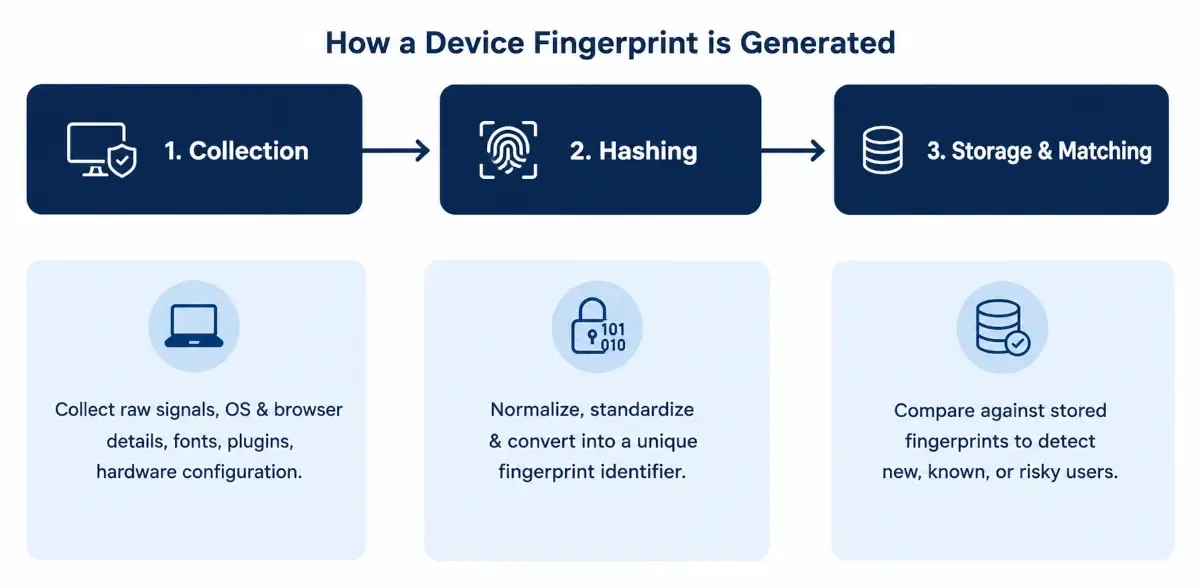
How a Device Fingerprint Is Generated
Whether the interaction happens through a web browser or a mobile app, device fingerprinting follows a three-stage process to generate and evaluate a device identity.
1. Collection
A lightweight script or SDK runs when a page loads or an app opens. The SDK collects device, browser, network, and screen information. It may also capture behavioural signals such as typing patterns or touch pressure. Together, these signals create a unique fingerprint biometric for the device to identify and assess risk. This step typically completes in under a second and requires no action from the user’s end.
2. Hashing
Once the device attributes are collected, they are standardised and processed through a hashing algorithm. The algorithm converts dozens of individual signals into a compact fingerprint that enables fast matching and assists with device comparison.
Hashing also adds another layer of privacy protection. Instead of exposing the underlying device characteristics, it transforms them into a unique identifier that cannot be easily traced back to specific hardware, software, or personally identifiable information.
3. Storage and Matching
The generated hash is stored in a device intelligence database along with information such as past sessions, previous fraud alerts, risk indicators, and known links to fraudulent accounts. This creates a historical record that helps risk teams assess future interactions more accurately.
On each new interaction, the newly generated hash is matched against this database to create a live fingerprint device record that risk teams can access in real time. Based on this comparison, the system generates a risk score using all available attributes before the user completes their next action.
Key Techniques Behind Device Fingerprinting
Each technique below captures a different part of the device's fingerprint identification profile. None of them is unique on its own, which is exactly why production systems run them together rather than relying on a single method.
1. Canvas Fingerprinting
Canvas fingerprinting works by asking the browser to render a hidden image or block of text using the HTML5 Canvas API. The resulting pixel output is then analysed to generate a unique signal. Because factors such as graphics hardware, drivers, operating systems, rendering engines, and font processing vary across devices, the same rendering instructions can produce subtle differences in pixel data. These variations help distinguish one device from another and contribute to the overall browser device fingerprint.
2. WebGL Fingerprinting
WebGL fingerprinting examines how a device processes and displays graphics. Small variations in graphics hardware, drivers, and software create unique patterns that help distinguish one device from another.
Since graphics configurations often vary across devices, manufacturers, and driver versions, WebGL provides another valuable layer of differentiation. When combined with other fingerprinting techniques, it helps improve the accuracy and resilience of device recognition.
3. Audio Fingerprinting
Audio fingerprinting works by generating a silent audio signal and processing it through the device's audio stack using the Web Audio API. The system then analyses the resulting waveform for subtle variations introduced by differences in hardware, drivers, operating systems, and audio processing components.
As these variations tend to remain consistent across sessions on the same device, the resulting audio fingerprint can serve as an additional identification signal.
4. TLS ( Transport Layer Security) and Network-level Fingerprinting
Network and TLS fingerprinting operate at the connection level, before any browser-based scripts are executed. When a device establishes a secure connection, the system analyses TLS characteristics such as supported cipher suites, protocol versions, and extension ordering. These attributes create a distinctive signature, often represented as a JA3 or JA4 fingerprint.
This network-level view becomes even more powerful when combined with signals such as IP reputation, autonomous system (AS) information, VPN or proxy usage, and connection behaviour patterns. Together, these indicators help fraud detection systems identify suspicious devices, automated tools, and high-risk infrastructure at the earliest stage of an interaction.
5. Font and Plugin Enumeration
Traditional desktop fingerprinting also analyses installed fonts and browser plugins, both of which can reflect the software history of a device. While plugin-based signals have become less valuable as modern browsers phase out plugin support, font enumeration continues to provide useful differentiation across desktop environments. This is particularly valuable for devices running specialised applications that install unique or proprietary font libraries, adding another layer of entropy to the overall device fingerprint.
No single fingerprinting technique can reliably stop fraud on its own. The strongest fraud prevention strategies combine multiple layers of device, network, and behavioural intelligence, creating several independent checkpoints for risk assessment. As a result, bypassing one signal rarely allows a fraudster to evade detection entirely.
Device Fingerprint vs. Cookies: What Are the Core Differences
Cookies and device fingerprints are different in the way they work. Both aim to recognise a returning user, but they differ in how they control and assist with detecting fraud. A cookie is a small file that is stored in the browser, and a user can delete it at any time. A device fingerprint, on the other hand, is derived from the device's own characteristics and cannot be cleared through a simple settings change. Below is a table that reflects the core differences between these two.
| Attribute | Cookies | Device Fingerprinting |
|---|---|---|
| Persistence | Cleared by user action | Survives clearing, resets, and browser switches |
| Storage location | Stored on the user's device | Not stored on the device; computed from live attributes |
| Cross-browser tracking | No | Yes, at the device-hash layer |
| User control | Full access to delete or block anytime | Limited access |
| Primary use | Session continuity, personalisation | Fraud detection, risk scoring |
| Regulatory treatment | Requires consent under most cookie laws | Falls under broader data protection rules |
Swipe the table
For fraud prevention, this difference in persistence matters. Cookies can be cleared or blocked, while device fingerprints can continue to provide recognition signals based on the device's attributes. This gives fraud systems another way to identify suspicious activity when cookie data is unavailable.
Solutions such as Sign3 take this a step further by combining device intelligence with behavioural biometrics, digital footprint analysis, graph intelligence, and risk scoring. This allows risk teams not only to identify suspicious devices but also to uncover linked accounts, detect coordinated fraud patterns, and stop high-risk activity before financial losses occur.
Mobile App Fingerprinting vs. Browser Fingerprinting
Browser fingerprinting and mobile app fingerprinting are both used to detect fraud and device recognition, but they work based on two different technical routes.
| Attribute | Browser Fingerprinting | Mobile App Fingerprinting |
|---|---|---|
| Signal source | JavaScript running inside the browser | SDK embedded directly in the app |
| Data depth | Canvas, WebGL, fonts, screen and rendering behaviour | OS-level hardware, sensors, root or jailbreak status |
| Entropy | High, due to wide configuration variability | Lower, due to hardware standardisation across models |
| Common evasion tactic | Spoofing extensions, headless browsers, script blocking | Emulators, rooted or jailbroken devices |
| Best suited for | Web login, checkout and web onboarding | App login, in-app payments and app onboarding |
Swipe the table
The practical difference shows up in accuracy and evasion resistance. Mobile SDK signals are generally harder to spoof than browser-based signals, making them more resilient against fraud. Sign3 unifies device intelligence across both web and mobile channels, ensuring risk context follows a user across touchpoints and enabling more consistent fraud detection.
Why Mobile Fingerprints Are Less Unique
Mobile device fingerprints are generally less unique than browser fingerprints because mobile operating systems expose fewer device attributes to apps, and privacy restrictions from Apple and Google further limit what can be collected. Research from the Electronic Frontier Foundation's Panopticlick project confirms mobile devices show lower fingerprint entropy than desktop browsers, meaning fewer distinguishing signals are available for identification.
-
Mobile OS-level restrictions limit access to hardware and system attributes, reducing the signals available for fingerprinting.
-
Many users share the same OS version, app version, and device model, creating larger groups of similar-looking devices.
-
Browsers vary widely through extensions, fonts, and plugins; mobile apps run in far more controlled, uniform environments.
However, this reduced entropy does not make mobile fraud detection weaker; it changes what a reliable system depends on. Rather than treating a single mobile fingerprint as a sufficient approach, fraud platforms combine SDK-level hardware signals with behavioural biometrics, network patterns, and historical device history for stronger results.
How Fraudsters Evade Device Fingerprinting
Fraud rings do not rely on a single evasion method. They typically combine several, layering technical manipulation with behavioural discipline. This helps to create a compromised identity that looks like many distinct users, or make many fraudulent attempts look like one legitimate returning user.
-
Virtual Machines and Emulators By running browsers or mobile apps inside a virtual environment, a fraud ring operator can spin up many "different" devices from just one physical machine. Resetting the environment after each session makes it look like a brand-new device every time.
-
Rooted and Jailbroken Devices When fraudsters gain admin-level access to a phone's operating system, they can alter data that apps normally read straight from the hardware or OS, such as device IDs, sensor readings, and build details.
-
Automation frameworks Fraudsters often misuse tools originally designed for browser testing and application automation to automate activities such as account creation, login attempts, form submissions, and other high-volume interactions. This allows them to operate at a speed and scale that would be impossible for a human user to achieve manually.
-
Anti-detect browsers and spoofing extensions Purpose-built browser configurations override the values a fingerprinting script would normally read. This helps present fabricated screen resolutions, fonts, and User-Agent strings designed to look like a different device on every session. An advanced fraud detection system does not attempt to block each evasion method individually. It evaluates the inconsistencies these methods leave behind. Once it identifies that fraud pattern, the system triggers manipulated environments even when an individual spoofing technique succeeds at hiding one specific attribute.
How Device Intelligence Helps Detect Modern Fraud
From account takeovers to synthetic identities, a handful of fraud patterns drive the majority of risk events faced by modern businesses. Solutions like Sign3 combine device intelligence with precise user fingerprinting and behavioural signals to detect these threats before they result in financial loss.
1. Account takeover
When a fraudster gains access to stolen credentials, the login attempt typically originates from a device the account has never used before. Device fingerprinting flags this mismatch instantly, triggering additional verification before the session proceeds.
Financial institutions in India reported 10,114 fraud cases worth Rs 48,021 crore in FY26, up 46.4 percent in value from Rs 32,803 crore the year before, according to the RBI's 2025-26 annual report, reinforcing why device-level detection at login carries as much weight as detection at the payment stage.
Read more: Account Takeover (ATO): Detection, Prevention & AI Techniques
2. Multi-accounting
Platforms offering referral rewards, promotional credits, or free trials are frequent targets for fraudsters creating multiple accounts using synthetic identities or money mule profiles. These accounts are often used to repeatedly exploit incentives or move illicit funds.
Since device fingerprints persist beyond cookie clearing and app reinstalls, organisations can identify when numerous accounts originate from the same underlying device, even when different emails, phone numbers, or payment methods are used.
Read more: Money Mules 101: Recruited, Coerced, or Complicit
3. Onboarding and identity abuse
During onboarding, especially for banking, lending, and other financial products, device fingerprinting helps assess the risk associated with a new applicant by comparing the device against known fraud signals, emulator activity, previously flagged devices, and links to suspicious or blocked identities.
This enables financial institutions to identify potential risks early and validate whether the applicant's digital behaviour aligns with the information provided.
Read more: Synthetic Identity Fraud: The Person Who Doesn't Exist
4. Payment and bonus abuse
In e-commerce, gaming and fintech, fingerprinting identifies devices attempting to exploit promotional codes, cashback offers or first-transaction discounts repeatedly by cycling through different accounts or payment instruments.
It also supports transaction-level risk scoring, flagging a checkout attempt from a device recently associated with chargebacks or card testing activity, before the payment authorises.
Sign3’s fraud intelligence layer is built around this exact set of problems. Its device intelligence and digital footprint layers give banks, fintechs, and lending platforms the ability to flag account takeover attempts, multi-accounting rings, onboarding fraud, and bonus abuse at the device level. This often happens before a transaction is even attempted, closing the gap between when fraud starts and when a risk team actually finds out about it.
Is Device Fingerprinting Legal Under DPDP Act?
Yes, device fingerprinting can be used lawfully under India’s DPDP Act, 2023, but it is not automatically exempt from data protection requirements. If fingerprinting involves digital personal data that can be linked to an individual, the organisation must process it for a lawful purpose and rely on consent or an applicable legitimate use under the Act.
For fraud prevention, organisations should clearly explain what data they collect and why, follow applicable notice requirements, and apply appropriate security measures. The 2025 DPDP Rules also require notices to clearly describe the personal data collected and the purpose of processing.
So, device fingerprinting itself is not prohibited under the DPDP Act. Its compliance depends on how the organisation collects, uses, stores, and protects the fingerprint data.
Conclusion
Based on the current scenario, the question for banks, lenders, fintechs, and digital platforms is no longer whether device intelligence should be part of the fraud stack, but how effectively it is being used today. If fraud decisions still depend primarily on credentials, OTPs, or isolated identity checks, there is a growing visibility gap that sophisticated attackers can exploit.
Platforms like Sign3 help close that gap by combining device intelligence with behavioural biometrics, digital footprint analysis, graph intelligence, and real-time risk scoring, enabling fraud teams to make faster and more confident decisions across the customer lifecycle. Book a demo and understand how the intelligence layer actually works and helps prevent fraud in real-time.
Frequently Asked Questions
Can device fingerprinting detect spoofing attempts?
Yes. Fraud detection systems look for inconsistencies between the attributes a spoofing tool presents and the way genuine devices actually behave: mismatched hardware combinations, rendering artefacts introduced by anti-detect browsers and timing patterns inconsistent with the claimed device type. These inconsistencies are frequently more revealing than any single spoofed attribute.
How is mobile fingerprinting different from browser fingerprinting?
Browser fingerprinting reads environment signals through JavaScript running inside the browser. Mobile fingerprinting runs through an SDK embedded in the app, giving it access to deeper OS-level and hardware signals that a browser script cannot reach, at the cost of somewhat lower entropy due to hardware standardisation across mobile devices.
What is cross-device fingerprinting?
Cross-device fingerprinting links activity from the same user or fraud ring across multiple devices. These include a phone, a laptop, and a tablet, by correlating shared signals such as network patterns, account behaviour, payment details, and timing correlation, rather than relying on a single device's fingerprint in isolation.
Does device fingerprinting work in incognito or private browsing mode?
Cookie-based tracking loses continuity in private browsing, but device and browser hash layers largely persist, since they are derived from hardware and rendering characteristics rather than stored session data. Private browsing mode limits some data points but does not eliminate fingerprinting effectiveness.
Is device fingerprinting accurate on its own?
No single fingerprint identification method should be treated as an accurate way to detect fraud signals. Accuracy comes from combining fingerprinting with behavioural analysis, network intelligence and historical device risk data, so a decision is based on multiple corroborating signals rather than one attribute.
How quickly does device fingerprinting return a result?
Collection, hashing and matching typically complete within milliseconds to a few seconds, fast enough to inform a real-time decision during login, signup or checkout without adding noticeable friction for genuine users.


