

Fraudsters can clear cookies, rotate IP addresses, switch devices, and create new accounts in seconds, bringing severe threats to fintechs. Yet they often leave behind something much harder to fake and erase: a browser fingerprint.
By analysing dozens of browser, device, and environment signals, browser fingerprinting helps fintechs and banks to recognise recurring users, uncover hidden connections between accounts, and detect suspicious activities in real time that traditional fraud control methods often miss.
In an era of synthetic identities, account takeovers, and mule networks, browser fingerprinting has become a critical layer of modern fraud intelligence. In this guide, we will discuss what browser fingerprinting actually is, how it is being adapted for most modern fraud detection, and how user fingerprinting can decide whether a login is trusted or flagged as suspicious. Here is exactly how it works, and why it is so hard to erase.
Key Takeaways
- A browser fingerprint combines dozens of device and browser attributes into a single, near-unique ID, without needing cookies.
- Common signals include user agent, fonts, screen resolution, timezone, IP address, and HTTP headers.
- Browser fingerprinting combines small bits of system and hardware data into a unique profile. Six major techniques are canvas, WebGL, audio, media device, font, and TLS fingerprinting that generate the strongest signals
- Banks and fintechs use browser and user fingerprinting to detect account takeover, bots, multi-accounting, bonus abuse, and other suspicious activity.
- Fingerprint spoofing is possible through anti-detection browsers, but modern fraud intelligence platforms like Sign3 can detect it.
What Is a Browser Fingerprint?
A browser fingerprint is a unique digital identifier that is created from the combination of browser, device, network, and environmental characteristics that a website can observe during an online session. Unlike cookies, which store data on a user's device, a browser fingerprint is generated from some existing attributes such as browser version, operating system, screen resolution, language settings, installed fonts, graphics capabilities, and device configuration.
No single attribute here can work to detect fraud. But when hundreds of signals are analysed together, they create a detailed profile that can recognise a returning browser, even if cookies are deleted, private browsing is used, or the IP address changes.
This ability to recognise devices beyond usernames, passwords, and cookies is why browser fingerprinting has become a strong foundational component of modern fraud intelligence platforms. It provides continuity across digital interactions, helping banks and financial organisations to distinguish genuine users from fraudsters attempting to commit fraud by hiding and constantly changing identities.
What Data Makes Up a Browser Fingerprint?
A browser fingerprint is not based on one piece of information. It combines many technical signals from the browser and device. Together, these signals can create a distinctive profile that helps recognise the same browser across sessions.
| Fingerprinting Signal | What It Includes |
|---|---|
| User Agent | Browser name, version, and operating system reported by the browser |
| Installed Fonts | The specific fonts installed and rendered on the device |
| Screen Resolution and Colour Depth | Display dimensions, pixel ratio, and available screen space |
| Timezone and Language | System language, locale settings, and UTC offset |
| IP Address | Network origin, often checked with location and ISP data |
| HTTP Headers | Accept-language, referrer, and connection details sent with each request |
| Hardware Concurrency and Memory | Number of CPU cores and approximate device memory |
| Browser Plugins and Extensions | Installed add-ons and their configurations |
Swipe the table
Not every website collects the same set of signals. Modern fraud detection platforms typically analyse a broader range of attributes and, more importantly, evaluate how those signals relate to one another.
The growing scale of modern fraud shows why deeper intelligence is essential for effective fraud detection. The RBI reported that the value of fraud cases in India's banking sector increased to ₹48,021 crore in FY2025–26, highlighting how financially damaging sophisticated fraud schemes have become. For fraud teams, the goal is not to identify a person but to assess the trustworthiness and consistency of the digital environment behind an interaction.
By correlating multiple browser and device attributes, banks and financial organisations can identify account takeover, synthetic identities, and fraudulent attempts to evade traditional security controls.
How a Browser Fingerprint Is Generated
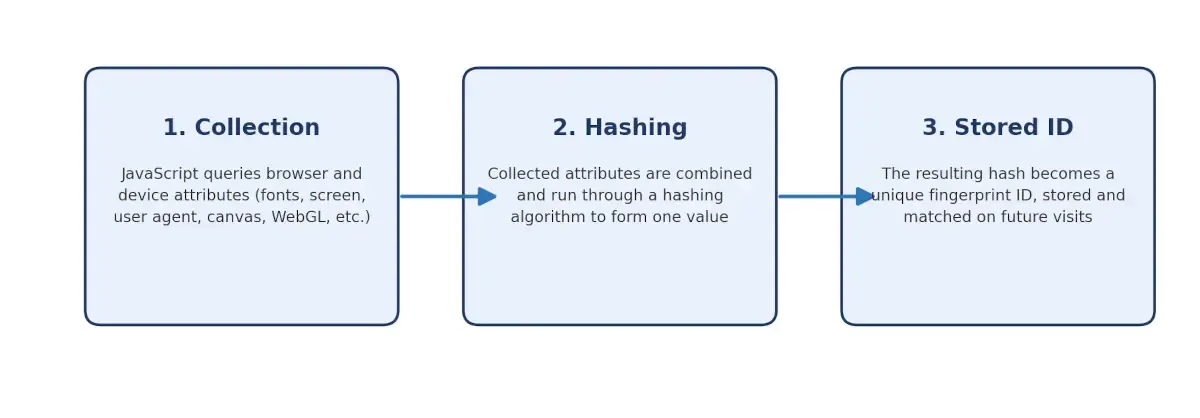
Generating a browser fingerprint is not a single action but a three-stage pipeline that runs quietly in the background every time a page loads. Regardless of which specific signals a site chooses to collect, the underlying flow always stays the same.
The method starts by gathering the data, compressing it into one value, and storing that value for future comparison between genuine and fake users. Understanding each stage explains why a fingerprint assesses much better than a browser cookie.
-
Collection: A JavaScript snippet, when embedded in the page, generates dozens of attributes through standard Web APIs. Canvas and WebGL for rendering signatures; the Web Audio API is used for audio processing, navigator properties for user agent and language, and screen properties for resolution and colour depth. The process typically completes under a few seconds, but it is usually invisible to the person browsing.
-
Hashing: The raw attributes are then gathered into a single string and then passed through a hashing algorithm. This is commonly a one-way function such as SHA-256. This process converts multiple data points into a fixed-length value called a hash. Instead of comparing every attribute separately, a fraud detection system can use this hash to quickly compare the fingerprint with previously stored values and identify a matching or similar device profile.
-
Stored ID: The resulting hash can serve as a fingerprint ID and is typically stored on the server rather than on the user's device. When the user returns, the system generates a new fingerprint and compares it with previously stored IDs. This helps identify returning devices, detect unfamiliar devices, and spot suspicious activity when the same device appears across different accounts.
Browser Fingerprinting Techniques Explained
The six most common browser fingerprinting techniques are canvas, WebGL, audio, media device, font, and TLS fingerprinting. Each targets a different layer of the browser and device stack. Fraud prevention platforms typically combine several of them at once rather than relying on any single technique alone, since each adds its own layer of resistance against fingerprint spoofing.
1. Canvas Fingerprinting: Canvas fingerprinting uses the HTML5 canvas element to render invisible text or shapes, then reads back the resulting image as pixel data. Since rendering depends on the device's graphics hardware, operating system, and installed fonts, no two devices develop the image in exactly the same way. The resulting pixel pattern is converted into a unique fingerprint that can be used to recognise the same device across multiple browsing sessions.
2. WebGL Fingerprinting: WebGL fingerprinting works similarly to canvas fingerprinting but draws on 3D rendering instead of 2D. It exposes details about the graphics processing unit, driver version, and rendering pipeline. Since GPU and driver combinations vary widely across devices, WebGL output adds an advanced signal that is difficult to mask.
3. Audio Fingerprinting: Audio fingerprinting uses the Web Audio API to process a sound signal and measure small differences in how a device handles it. These differences come from the device's hardware and software. No sound is played for the user. The results create a unique signal that can help recognise the same device across browsing sessions.
4. Media Device Fingerprinting: This technique checks the media devices connected to a system, such as microphones, cameras, and speakers. The number and type of these devices can vary from one computer to another, adding another signal to the browser fingerprint.
5. Font Fingerprinting: Font fingerprinting checks which fonts are installed on a device by comparing how text appears in different typefaces. Since font collections vary across devices, operating systems, and installed software, this information can help make a device's fingerprint more distinctive.
6. TLS Fingerprinting: TLS fingerprinting examines how a device establishes a TLS connection. It looks at details such as cipher suites, supported extensions, and protocol versions to create a distinctive signature. Methods such as JA3 and JA3S can help identify automated traffic because bots and scripted tools may produce TLS connections that differ from those of genuine browsers.
No single technique above is as effective when working in isolation. Each of them can be individually spoofed or blocked. Sign3's device intelligence layer combines signals from canvas, WebGL, TLS, and the other techniques into one confidence score, so faking any single signal rarely fools the system as a whole.
Browser Fingerprint vs. Cookies: What Are the Core Differences
The key difference between browser fingerprint and cookies is in storage. A cookie is a file that is saved on the user's device, while a browser fingerprint is never stored locally at all. It is rebuilt from device and browser characteristics on every visit. That single difference is what makes a fingerprint considerably more persistent and harder for a user to reset than a cookie, which can simply be viewed, blocked, or deleted at any time.
| Key Aspect | Cookies | Browser Fingerprint |
|---|---|---|
| Storage Location | Stored locally on the device | Not stored; recalculated each visit |
| User Control | Can be viewed, blocked, or deleted | Cannot be cleared like a file |
| Persistence | Lost when cleared or blocked | Persists across sessions and cookie clears |
| Cross-Browser Tracking | Limited to one browser | Can identify a device across browsers in some cases |
| Ease of Blocking | Blocked by privacy settings and extensions | Harder to block without breaking site functionality |
Swipe the table
Fraudsters can routinely clear cookies, switch browsers, or operate in private browsing modes to appear as new users. Browser fingerprinting adds a stronger layer of continuity by helping organisations recognise returning devices despite these tactics. When combined with device intelligence, behavioural analytics, and risk scoring capabilities, platforms like Sign3 can move beyond simple identification to uncover patterns of abuse, detect linked fraud activity, and make more informed risk decisions in real time.
Browser Fingerprint vs. Device Fingerprint vs. Digital Footprint: How These Three Are Different
These three terms are often used interchangeably, but they describe different scopes of identification. A browser fingerprint is limited to certain signals exposed through the browser. A device fingerprint extends further, generating results based on hardware and OS-level attributes, often through a native SDK on mobile. A digital footprint is broader still, encompassing behavioural and activity data accumulated across sessions, apps, and platforms over time.
| Aspect | Browser Fingerprinting | Device Fingerprinting | Digital Footprint |
|---|---|---|---|
| Scope | Browser-level attributes only | Hardware, OS, and sensor-level data | Behaviour and activity across sessions |
| Typical source | JavaScript in the web browser | Native SDK on web or mobile app | Aggregated logs, transactions, and interactions |
| Persistence | Resets if browser changes significantly | Tied closely to the physical device | Builds continuously over time |
| Primary use case | Web fraud detection, analytics | App fraud prevention, emulator detection | Risk scoring, behavioural profiling |
Swipe the table
In practice, these three signals are most effective when used together. Browser fingerprints identify the environment, device fingerprints validate the device itself, and digital footprints provide the behavioural context needed to assess trust and detect fraud with greater accuracy.
Web vs. Mobile Fingerprinting: Why Fraud Detection Requires Both
Web fingerprinting and mobile app fingerprinting rely on different technical foundations, even though the underlying goal is the same: recognising a device reliably. On the web, fingerprinting depends on JavaScript running inside the browser and is limited to the APIs and signals the browser exposes.
Mobile app fingerprinting, on the other hand, is built into the app itself through a native SDK, which can access a broader range of signals including device model, OS build, sensor data, installed apps, root or jailbreak status, and emulator indicators.
This distinction matters for fraud teams that operate across both surfaces. A fraud ring blocked on a website through browser-based signals such as canvas, TLS, or fingerprint analysis may simply shift the same attack to a mobile app, where those signals are unavailable or less effective. As a result, effective fraud prevention requires a fraud intelligence layer that can work on both web and mobile environments. This approach correlates device, behavioural, and identity signals to maintain greater visibility as attackers move across multiple channels.
The need for this cross-channel visibility is growing alongside India's rapidly expanding digital economy. According to the Reserve Bank of India, digital payment transactions exceeded 180 billion in FY2024–25. At this scale, even a small percentage of fraudulent activity can translate into significant financial losses, making unified device and risk intelligence critical for detecting coordinated fraud networks before they can scale across multiple platforms.
This is where a platform like Sign3 fits in. Sign3 builds device intelligence and fraud prevention infrastructure for banks, NBFCs, and fintechs, combining device fingerprinting, behavioural signals, and risk scoring across both web and mobile app journeys. Rather than relying on a single fingerprinting technique, Sign3's approach is designed to correlate signals across the enitre user journey, which makes it harder for fraud rings to exploit gaps between web and app-based defences.
How Browser Fingerprinting Stops Fraud Issues
For BFSI institutions, browser fingerprinting has become a core layer of fraud defence, situated alongside OTPs, device binding, and behavioural analytics. The Reserve Bank of India has flagged the scale of the shift. RBI Deputy Governor T. Rabi Sankar has noted that fraud reported per transaction is on the rise, and RBI data has shown digital scams increasing by more than 30% year-on-year between 2022 and 2024. Browser fingerprinting adds another layer of visibility by analysing the device and browser environment behind a transaction, rather than relying only on the credentials used.
- Account Takeover (ATO): When a fraudster uses stolen credentials from an unfamiliar device, fingerprinting flags the mismatch against the genuine user's known device profile. This triggers additional step-up verification, helping organisations detect potential account takeover attempts and prevent unauthorised access that could lead to financial loss or misuse of customer data.
Learn more: Account Takeover (ATO): Detection, Prevention & AI Techniques
-
Bot Detection: Automated scripts, bots, and headless browsers used in credential stuffing, account takeover, and large-scale scraping attacks often leave inconsistencies in their digital fingerprints. By analysing certain signals such as TLS characteristics, browser behaviour, and canvas-rendering patterns, fraud detection platforms can distinguish automated traffic from genuine user activity and block suspicious sessions before they reach login, registration, or onboarding workflows.
-
Multi-accounting: Fraudsters frequently create multiple accounts using synthetic or stolen identities to exploit onboarding incentives, referral programmes, or lending workflows. When the same underlying browser fingerprint reappears across multiple accounts that claim to belong to different individuals, it can reveal a hidden relationship between seemingly unrelated applications. This enables fraud teams to identify account farming, synthetic identity networks, and repeat offenders that may pass conventional KYC checks.
-
Bonus and Promo Abuse: Referral programmes and sign-up bonuses are frequent targets of fraudsters to abuse through fake or duplicate accounts. Browser fingerprinting links these fake accounts and identifies the link connected to a shared device or emulator, even when other identity details are varied.
Fraud teams get more value from browser fingerprinting when they use it as part of a broader risk score rather than as a simple yes-or-no fraud check. This approach combines device, behavioural, and network signals before flagging a session. This is the core approach behind Sign3's fraud intelligence platform.
How Fraudsters Spoof or Evade Fingerprints
Fraudsters spoof browser fingerprints using three main methods: anti-detect browsers, headless automation frameworks, and fingerprint randomisers. As fingerprinting has become a standard practice in fraud prevention, these evasion tactics have grown more sophisticated, which is why understanding them is essential for building defences that hold up against motivated, well-resourced fraud rings, not just casual attempts.
- Anti-detect browsers: These are purpose-built browsers that allow users to manually configure or randomise dozens of fingerprint attributes at once. They can create a modified device profile designed to hide or alter fingerprint signals while making the browser appear more like a regular user environment.
- Headless automation frameworks: Top choices include Playwright by Microsoft, Puppeteer by Google, Selenium with headless flags, and Cypress. These are often modified with stealth plugins and used to script large volumes of fraudulent activity while attempting to mask the telltale signs that distinguish automated browsers from genuine user browsers.
- Fingerprint randomisers: These are browser extensions or scripts that alter canvas output, WebGL renderer strings, or font lists between sessions. Their primary aim is to break the consistency that fraud systems rely on to recognise a returning device.
This is where the concept of fingerprint spoofing comes into the scene. A well-configured anti-detect browser can evade the basic fingerprinting checks, but it typically leaves inconsistencies such as mismatched time zones and IP geolocation, unnatural attribute combinations, or behavioural patterns that do not match a real user. Sign3’s fraud intelligence layer works in this context, helping banks and financial organisations to detect fraudulent activities in real time.
NOTE: A device can look entirely normal on the surface and still be linked to fraud once its signals are examined collectively. By analysing browser fingerprints alongside timezone alignment, location patterns, and real-time session behaviour, Sign3 helps identify inconsistencies that frequently reveal anti-detect browsers and other attempts to mask digital identity.
Is Browser Fingerprinting Legal? GDPR and CCPA Compliance Explained
Browser fingerprinting is not inherently illegal, but its use is subject to privacy regulations such as the European Union's General Data Protection Regulation (GDPR) and the California Consumer Privacy Act (CCPA).
Both frameworks regulate how organisations collect, process, and use personal information rather than banning a specific technology outright. Under GDPR, browser fingerprinting may involve the processing of personal data, meaning organisations need an appropriate legal basis for that processing. Depending on the use case, this could include consent or legitimate interest. Fraud prevention and security can be potential legitimate interests, but organisations must still assess whether the processing is necessary and balance their interests against individuals' rights.
CCPA, on the other hand, takes a similar approach by requiring businesses to provide required privacy disclosures about the personal information they collect and how it is used. Consumers may also have applicable rights regarding access, deletion, correction, and opting out of the sale or sharing of personal information, subject to applicable exceptions.
For fraud prevention teams, compliance requires more than simply having a security purpose. Organisations should implement browser fingerprinting transparently, collect only what is necessary for the stated purpose, maintain clear privacy disclosures, and assess the applicable legal basis and consumer rights. When deployed within a robust privacy governance framework, browser fingerprinting can support fraud detection objectives while helping organisations meet regulatory obligations.
NOTE: Fraud prevention platforms are built for regulated industries, including Sign3. Fraud intelligence layers are typically designed around data minimisation and purpose limitation from the outset, collecting only the signals needed to assess risk rather than broad behavioural tracking.
Final Words
Fraud rings exploit every disconnected signal between digital channels. If a device blocked on the web can return through a mobile app undetected, the fraud problem isn't solved; it has simply shifted to another channel. Browser fingerprinting helps close that gap when combined with device intelligence, behavioural biometrics, and risk signals. Together, these signals help detect threats across multiple touchpoints.
Sign3, the fraud intelligence framework, builds that layered defence for banks, NBFCs, and fintechs across India, correlating web and mobile signals to catch account takeover, bots, multi-accounting, and bonus abuse before they actually cause severe losses. Book a demo and explore how Sign3 helps stop fraud in real time and strengthen your fraud stack against future attacks.
Frequently Asked Questions
Can browser fingerprinting be blocked?
Browser fingerprinting cannot be blocked. Privacy-focused browsers and extensions can reduce or randomise some signals. However, blocking every signal without breaking site functionality is difficult, which is why fingerprinting remains harder to fully evade or erase than cookies.
Is browser fingerprinting the same as tracking cookies?
No. Cookies are files stored on a device and can be deleted by the user. A browser fingerprint is calculated from device and browser attributes each time a page loads, so it does not depend on any stored file and cannot be cleared the same way.
Does incognito or private browsing mode stop fingerprinting?
Not entirely. Private browsing modes prevent cookies and history from being saved locally, but most of the attributes used in fingerprinting, such as screen resolution, fonts, and hardware details, remain visible to scripts regardless of browsing mode.
How accurate is a browser fingerprint over time?
Accuracy can drift as browsers update, fonts are installed or removed, or hardware changes. Most fraud platforms account for this by tracking fingerprint similarity and gradual change rather than expecting an exact match on every visit, which allows them to recognise a device even after minor updates.
What is fingerprint spoofing, and can it fool fraud systems?
Fingerprint spoofing means changing or faking the device and browser details that fingerprinting tools collect. Fraudsters may use anti-detect browsers or other tools to do this. Basic fraud checks may sometimes be fooled, but advanced fraud systems compare multiple device, network, and behaviour signals. This makes it much harder to hide the same device or activity consistently.
Is there a browser fingerprint test I can run?
Yes. Several public tools let users see what their own browser fingerprint reveals, including how unique it is compared to other visitors. Running a browser fingerprint test is a useful way to understand exactly which signals are exposed and how identifiable a given browser configuration really is.


