

Keystroke dynamics is a behavioural biometric technology that analyses how users type to help verify identity and detect fraud. Unlike passwords or OTPs, it uses unique typing patterns as a passive security signal throughout a digital session.
Passwords and OTPs can confirm a user's identity at login, but they cannot always detect what happens after that. A fraudster who gains access to valid credentials may continue using the account without triggering traditional security checks. This makes it harder for organisations to detect account takeovers and suspicious activity in real time. Keystroke dynamics addresses this gap by analysing how a person types and flagging changes that may indicate someone else is using the account.
This guide explains what keystroke dynamics is, how it works, the key metrics it measures, its accuracy and limitations, and how organisations use it to support modern fraud detection and identity verification.
Key Takeaways
- Keystroke dynamics reads typing rhythm rather than the characters typed, so it can confirm who is behind the keyboard even when the password entered is completely correct.
- Unlike passwords or one-time MFA checks that verify identity once, keystroke dynamics keeps comparing behaviour for as long as a session runs.
- Dwell time, flight time, digraph timing, and trigraph timing combine to form a rhythm profile that is difficult to imitate on demand.
- Keystroke dynamics meaningfully strengthens account takeover detection when combined with other behavioural biometrics and device signals, rather than being used as a single check.
- Keystroke dynamics should feed a broader fraud risk score alongside other signals, not act as a stand-alone pass-or-fail gate, since no single behavioural signal is conclusive on its own.
What Is Keystroke Dynamics?
Keystroke dynamics is a behavioural biometric technology that identifies users based on how they type, not just what they type. Every person develops a unique typing rhythm through unconscious patterns such as key hold times, typing speed, and the intervals between keystrokes. These signals create a behavioural fingerprint that is extremely difficult for fraudsters to imitate.
A password can be copied or handed over, but a typing pattern cannot. Two people can type the same password with the same characters and still produce entirely different rhythms. That difference is what makes keystroke dynamics valuable for authentication and fraud detection.
As keystroke dynamics authentication matures, it works alongside typing biometrics and typing behaviour analysis as a passive signal. The technology never asks for any additional information from the user.
A Brief History: 25+ Years of Research
Academic interest in keystroke dynamics spans more than two decades, moving from manual timing thresholds to today's machine learning models.
-
2000 : The Foundational Paper
In 2000, Fabian Monrose and Aviel Rubin published Keystroke Dynamics as a Biometric for Authentication, one of the field's foundational papers. Their research showed that keystroke durations (dwell times) and latencies between successive keystrokes (digraph timings) could be captured consistently enough to create a behavioural biometric capable of distinguishing one user from another. -
2000s to 2010s : Statistical Maturity
Keystroke dynamics moved from an academic curiosity to a formally studied biometric, evaluated alongside fingerprint and iris recognition using statistical and threshold-based models. This period focused on learning how much natural variance exists within one person's own typing, and how to separate that ordinary noise from a genuine identity mismatch. -
2010s to present : The Machine Learning Era
Convolutional and recurrent neural network classifiers, including CNN and LSTM models, replaced hand-tuned thresholds. Accuracy improved as a result, and so did liveness detection: the ability to tell a real hand typing in real time from scripted or replayed input built to mimic it. -
Present : Continuous Authentication
Keystroke dynamics has evolved from login verification to continuous session monitoring. This allows organisations to detect suspicious behaviour even after a user has successfully logged in.
That history matters for anyone evaluating keystroke dynamics for user authentication today. It is a field with more than 25 years of peer-reviewed grounding, not a marketing term.
How Keystroke Dynamics Works
Keystroke dynamics for user authentication relies on a small set of timing measurements captured every time someone types on a keyboard or touchscreen. Four features form the foundation of most keystroke dynamics systems, and the sections below explain how each one contributes to a user's typing profile.
-
Dwell time : How long a key stays pressed before it is released. This reflects muscle memory more than conscious habit, so it tends to stay stable for the same person across repeated sessions. This makes dwell time a reliable baseline signal even before any other measurement is added.
-
Flight time : The gap between releasing one key and pressing the next. It's often the most distinctive part of a person's typing signature, since it reflects hand geometry, finger reach, and habitual movement patterns that are hard to consciously alter, even when someone tries to slow down and type more carefully.
-
Digraph timing : The combined timing across two consecutive keys, such as the transition from K to E in “KEY.” Common letter pairs recur constantly in normal typing, so digraph timing gives a system enough repeated samples to build a reliable profile quickly, without needing an unusually long enrollment session.
-
Trigraph timing : Timing measured across three consecutive keys, adding a further layer of precision on top of digraph analysis. Because it captures a longer motion sequence, it is harder to replicate by chance than a two-key digraph, which makes it useful for tightening a profile once enough typing data has been collected.
Consider the word “KEY” as an example: dwell time measures how long the K, the E, and the Y are each held down; flight time measures the pause between releasing K and pressing E, and again between releasing E and pressing Y; the K-to-E transition forms one digraph, and the full K-E-Y sequence forms a trigraph. Multiply that across an entire sentence, and the result is a timing fingerprint most people never consciously notice they have.
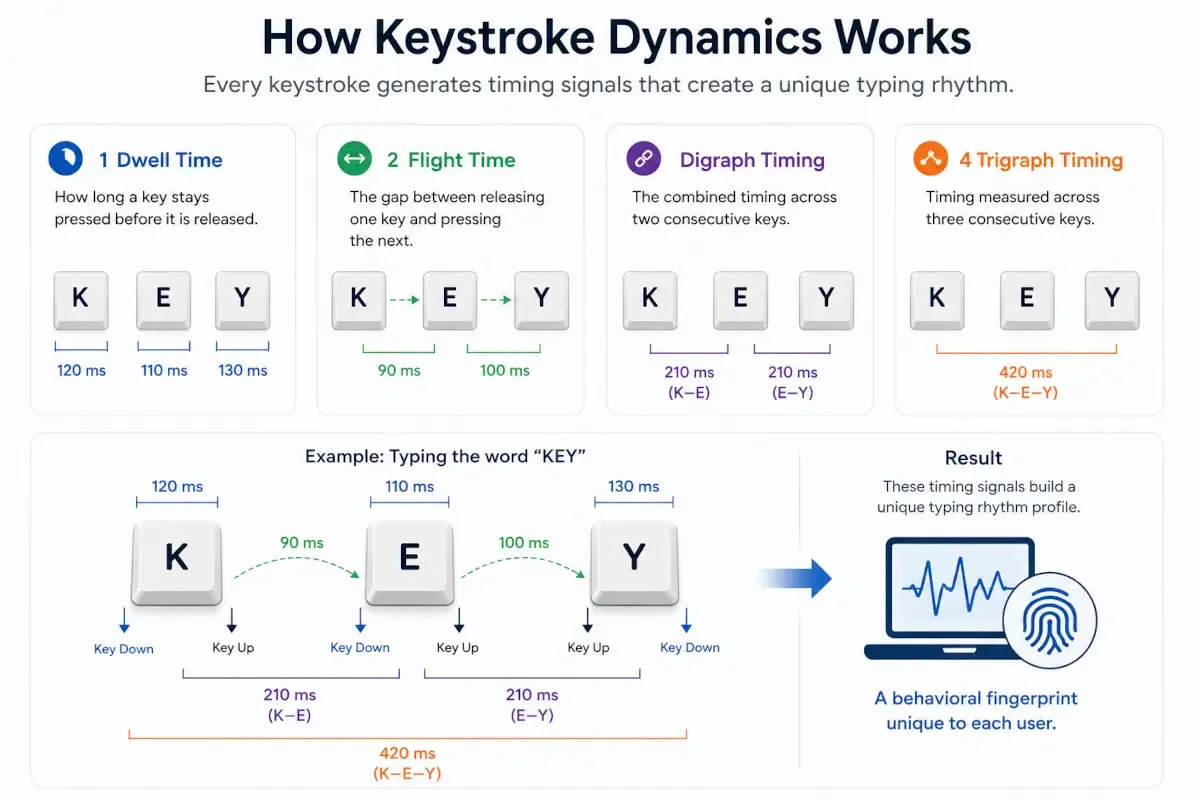
Together, these measurements build a typing rhythm profile unique enough to separate a genuine user from an impostor, even when both know the correct password. That is the technical foundation behind every claim made about keystroke dynamics as a biometric for authentication.
How Keystroke Dynamics Fits Into Modern Fraud Detection
Keystroke dynamics is not used as a standalone security control. Modern fraud prevention systems combine behavioural signals with device intelligence, digital footprint analysis, and traditional authentication methods to build a more complete view of user risk. Rather than making decisions from typing behaviour alone, keystroke dynamics contributes to a broader risk assessment framework that continuously evaluates whether a session appears legitimate.
Modern Fraud Detection Stack
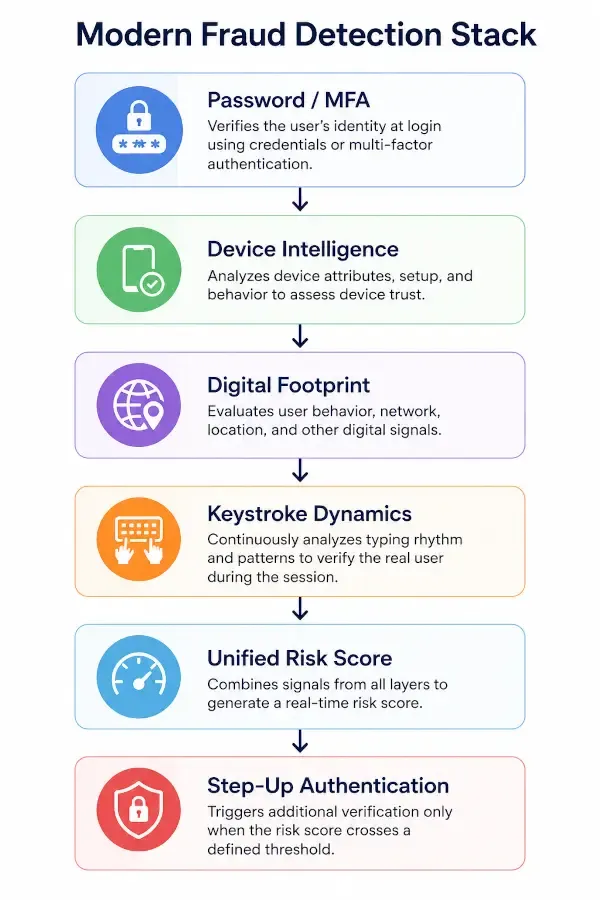
Modern fraud prevention uses multiple layers of intelligence, with each layer contributing a different signal about the user, device, or session.
-
Passwords and MFA verify access at login. They help confirm that the user knows the correct credentials or possesses a trusted authentication factor. However, these controls typically validate identity only at login and do not continuously monitor user behaviour throughout a session.
-
Device intelligence evaluates the device being used. It analyses signals such as device reputation, operating system, browser configuration, and historical usage patterns. These insights help identify unfamiliar or potentially risky devices that may indicate fraudulent activity.
-
Digital footprint analysis examines broader behavioural and network signals. This can include IP reputation, geolocation consistency, proxy or VPN usage, and historical activity patterns. Together, these signals provide additional context for assessing whether a user's behaviour appears legitimate or suspicious.
-
Keystroke dynamics helps verify that the person behind the keyboard remains consistent with the enrolled user. By analysing typing rhythm and keystroke timing patterns, it adds a continuous behavioural layer of identity verification. This helps organisations detect account takeover attempts and suspicious activity even after a user has successfully logged in.
Together, these inputs feed a unified risk score that determines whether additional verification is required.
What Does a Typing Shift Signal?
A single change in typing rhythm does not prove fraud on its own. But when several signals work together, they show a real risk score. According to data shared by the Ministry of Finance in the Lok Sabha, India recorded approximately 10.64 lakh UPI fraud incidents involving ₹805 crore during FY 2025–26 (up to November 2025). At that scale, one flagged signal is not enough to detect fraud.
-
Rhythm mismatch : If the pattern of typing is very different from the normal pattern of that user, it could be that their account has been taken over by someone else. Even with valid credentials, a mismatch in typing rhythm may indicate account takeover or unauthorised access.
-
Sudden typing speed change : A change in control from the legitimate user to another party can be indicated by a sudden change in typing speed or cadence while actively using the computer. Such changes could indicate session hijacking or other mid-session account compromise.
-
Near-perfect keystroke timing : Human typing naturally contains small variations between keystrokes. Consistent millisecond-level timing patterns usually indicate automated input, not real human interaction.
-
Zero variance between keystrokes : In ordinary typing, large numbers of keystrokes with repeated identical intervals are very unlikely. This pattern is commonly observed in scripted, imitated, or otherwise automated input activity.
-
Large paste event mid-session : Filling large blocks of text in fields users normally fill in themselves may indicate pre-collected credentials, stolen information, or automated form-filling tools rather than actual user input.
-
Session timing drift : A slow change in typing behaviour during a session can indicate remote access fraud or assisted account takeover. Unlike a sudden transition, timing drift can indicate a fraudster gradually influencing or taking over the user’s actions.
None of these signals should trigger a block on their own. When used correctly, they feed into a broader risk score alongside device intelligence and digital footprint data, adding step-up authentication only when combined risk crosses a threshold.
At Sign3, this is exactly how typing rhythm is used. The fraud intelligence layer evaluates the risk score during each session and increases accuracy in detecting fraudulent activities. This layered approach also reflects a broader principle in modern fraud prevention: no single signal detects every threat, so effective fraud programs rely on multiple risk rules working together.
Read more : Fraud Detection Rules Every Fintech Should Implement
Keystroke Dynamics vs. Traditional Authentication
Passwords and one-time codes remain necessary, but each proves identity only at a single moment. The table below breaks down where each method holds up and where it falls short.
| Capability | Password | OTP / MFA | Keystroke Dynamics |
|---|---|---|---|
| Verifies Identity at Login | Yes | Yes | Yes |
| Keeps Working After Login | No | No | Yes |
| Detects Account Takeover | Limited | Limited | Strong |
| Requires User Action | Yes | Yes | No, passive |
Swipe the table
Passwords and MFA confirm identity once. Keystroke dynamics is the only one of the three that keeps confirming identity for as long as the session runs, which is exactly the gap it is built to close.
Static vs. Continuous Authentication
Keystroke dynamics is applied in two distinct ways, including static authentication and continuous authentication.
-
Static authentication evaluates typing behaviour at specific authentication points, such as account registration, login, or password reset. It helps determine whether the person entering the credentials matches the expected user.
-
Continuous authentication monitors typing behaviour throughout an active session. Instead of making a one-time decision at login, it continuously checks whether the user's behaviour remains consistent over time.
The table below compares these two approaches and highlights where each adds value.
| Key Aspect | Static Authentication | Continuous Authentication |
|---|---|---|
| When It Checks | At specific authentication points, typically during login | Continuously or periodically throughout an active session |
| What It Confirms | Whether the user can provide valid credentials at the time of login | Whether ongoing behaviour remains consistent with the enrolled user profile |
| Typical Trigger | Passwords, OTPs, MFA, or biometric login checks | Behavioural signals such as typing rhythm, mouse movements, touch interactions, and device activity |
| Gap It Leaves | Limited visibility into what happens after authentication succeeds | Requires a reliable behavioural baseline and sufficient user activity for comparison |
| User Action Required | Yes, users must actively complete an authentication step | No, operates passively in the background during normal usage |
Swipe the table
A banking app, for example, might use static keystroke dynamics at login to confirm the account holder is typing the password, then quietly monitor typing rhythm for the rest of the session to detect signs that control of the device has changed hands.
That second layer closes a gap that passwords and one-time MFA checks cannot cover. It is also the model Sign3 follows in its own behavioural biometrics layer: a static check before logging in, followed by continuous monitoring for the duration of the session.
Why Keystroke Dynamics Matters for Fraud Detection Teams
For fraud teams, keystroke dynamics adds value precisely where traditional controls fall short: after login. Passwords and MFA verify identity at a single point in time. Once a login is successfully bypassed, most systems have no ongoing way to confirm the person is still who they say they are. Keystroke dynamics closes that gap across several fraud patterns.
-
Account takeover : Detects when an account is being used by someone other than the legitimate user, even after valid credentials have been entered. Certain changes in typing behaviour can reveal that control has shifted to an attacker.
Read more : Account Takeover (ATO): Detection, Prevention & AI Techniques -
Credential stuffing : Helps identify automated login attacks that test large volumes of stolen credentials. Unlike human users, bots often produce highly consistent typing and interaction patterns.
-
Session hijacking : Detects behavioural changes during an active session that may indicate the account is no longer being used by the person who originally authenticated.
-
Remote access scams : Identifies typing patterns that suggest a user is being controlled by a fraudster during a session. This can help detect scams that traditional device and location checks may miss.
-
Mule account activity : Helps uncover multiple accounts linked to organised fraud networks by identifying unusual or related behavioural patterns across multiple users. As mule account activity continues to grow, behavioural signals provide an additional layer for detecting suspicious account relationships.
These are the real advantages of keystroke dynamics. It works passively, asks nothing additional of the user, and keeps verifying identity throughout the session rather than just during the login.
How Fraud Detection Teams Actually Use These Signals
Fraud teams use these signals to build a risk profile for each session. A new device or location may not be suspicious on its own, but when combined with behavioural signals such as a typing rhythm mismatch, the overall risk can increase significantly.
The table below illustrates how these signals may contribute to a fraud risk assessment.
| Signal | Risk Level | Why It Matters |
|---|---|---|
| New Device | Medium | May indicate access from an unfamiliar device |
| New Location | Medium | May indicate unusual or unexpected access |
| Typing Rhythm Mismatch | High | Suggests the activity may be coming from a different user |
| Large Paste Event | Low to Medium | Suspicious mainly when combined with other risk signals |
| Remote-Access Indicators | High | Often associated with scam or fraudulent activity |
Swipe the table
This results in step-up authentication. A new device or location alone may not be suspicious. But when multiple signals appear together, particularly a significant mismatch between the user's current typing behaviour and their established profile, the combined risk can exceed a predefined threshold, triggering an account or activity block.
How Sign3 Puts Keystroke Dynamics to Work
Sign3’s fraud intelligence network treats keystroke dynamics as one signal inside a larger behavioural biometrics engine, not as a standalone product. It checks:
-
Typing rhythm: dwell, flight, digraph, and trigraph timing, continuously compared against the enrolled baseline. This allows the Sign3 intelligence network to detect a rhythm mismatch after a session has already begun, not only at login.
-
Mouse and touch behaviour: cursor movement and touch behaviour across the session, used to flag bots and scripted interactions that a human would not naturally produce, even when the same script has already passed a keystroke-based check.
-
Device intelligence: hardware and configuration details are used to confirm a login is coming from a device the real user has used before. The intelligence layer also provides a supporting context when a behavioural signal alone is suspicious.
-
Digital footprint: shows the account's activity history, used to spot accounts that look valid on paper, such as correct documents and a working phone number, but have no real usage trail behind them.
By combining keystroke dynamics with behavioural biometrics, device intelligence, and digital footprint analysis, Sign3 moves beyond one-time authentication and toward continuous trust verification. This layered approach helps fraud teams detect suspicious activity as it unfolds, allowing them to respond to risk in real time rather than after a loss has already occurred.
Limitations of Keystroke Dynamics
Keystroke dynamics can be a powerful behavioural biometric, but it is not a standalone fraud detection solution. Typing patterns provide valuable signals about user identity and session integrity, yet those signals can be affected by factors such as device changes, injuries, fatigue, accessibility tools, and natural variations in user behaviour.
1. Template ageing
A person's typing rhythm drifts gradually over time as habits change. Profiles that are not refreshed regularly produce more false positives, flagging genuine users because the profile is outdated, not because their behaviour actually changed.
To maintain accuracy, modern keystroke-dynamics systems continuously or periodically refresh user profiles rather than treating enrollment as a one-time process.
2. Device changes
Device changes can affect typing behaviour. Keystroke dynamics models trained on a physical keyboard may perform differently when a user switches to a laptop with a different layout, a new keyboard, or a touchscreen device. These changes can alter typing speed, key transitions, and overall rhythm without indicating fraudulent activity.
To reduce false positives, effective systems account for device context, adjust matching thresholds, or initiate a brief re-enrollment process when a legitimate device change is detected rather than automatically treating the new device as suspicious.
3. Physical and emotional state
Physical and emotional factors can affect typing behaviour. Injuries, fatigue, stress, illness, or other temporary conditions can alter dwell times and flight times enough to make a legitimate user's typing pattern appear unusual.
For this reason, keystroke-dynamics systems should treat a single anomalous session as one risk signal among many rather than automatically blocking access or locking an account.
4. Accessibility needs
Assistive technologies can affect typing patterns. Users who rely on accessibility tools such as speech-to-text software, alternative keyboards, switch devices, predictive text, or other assistive input methods may generate interaction patterns that differ significantly from conventional typing behaviour. Without appropriate accommodations, these differences can increase the risk of false positives.
Considering these limitations, keystroke dynamics is most effective when combined with device intelligence, digital footprint analysis, and other risk indicators rather than used as the sole basis for authentication or fraud decisions.
Final Word: The One Credential a Fraudster Can Never Steal
Frauds occur when passwords leak, OTPs get phished, and even faces and fingerprints can be spoofed with the right tools. But the typing rhythm is different, something built from years of muscle memory, and it is nearly impossible to fake convincingly across an entire session.
That is why keystroke dynamics is becoming a standard layer in fraud detection rather than an experimental add-on. When used effectively alongside device intelligence, digital footprint checks, and other behavioural biometrics, it gives fraud detection teams what static logins never could: a way to keep asking whether this is really the account owner, for as long as the session runs.
See how Sign3 puts keystroke dynamics to work inside a real-time fraud detection stack. Book a demo.
Frequently Asked Questions
What is keystroke dynamics?
Keystroke dynamics is a behavioural biometric that identifies a person based on their unique typing rhythm, measured through timing patterns like dwell time and flight time, rather than the content they type.
Is keystroke dynamics a biometric?
Yes. Keystroke dynamics as a biometric for authentication has been studied since the early 2000s, alongside fingerprint and iris recognition, because typing rhythm is difficult to replicate even when the typed content, such as a password, is known.
Can keystroke dynamics detect account takeover?
Yes. Continuous keystroke dynamics monitoring can flag a shift in typing rhythm mid-session, a strong indicator that account control has passed from the legitimate user to an attacker, even when the login credentials were correct.
Can attackers spoof keystroke dynamics?
Replicating another person's exact dwell time, flight time, and digraph pattern is difficult, though not theoretically impossible with enough recorded samples and specialised tools. This is why keystroke dynamics works best as one layer in a broader fraud detection stack rather than a standalone defence.
Does keystroke dynamics capture what users type?
No. Keystroke dynamics measures timing between keystrokes, not the characters themselves. It does not function as a keylogger and does not need to know the content being typed to build or match a rhythm profile.
How much typing data does keystroke dynamics need?
Most systems can begin building a profile after relatively small amounts of text, but accuracy improves as more interaction data becomes available. Continuous authentication systems generally become more reliable as session length increases and additional behavioural signals are collected.
What's the difference between keystroke dynamics and behavioural biometrics?
Keystroke dynamics is one category within the broader field of behavioural biometrics. Behavioural biometrics also includes mouse dynamics, touch behaviour, and gait analysis on mobile devices, all measuring how a person naturally interacts with a device rather than what they enter.
How accurate is keystroke dynamics?
Accuracy depends on the length of the typing sample, the quality of the enrolled profile, and how recently that profile was updated. Longer sessions and continuous monitoring generally produce more reliable results than a single short login attempt.
What industries use keystroke dynamics?
Banking, fintech, insurance, e-commerce, and enterprise workforce authentication are among the sectors applying keystroke dynamics, mainly to strengthen account takeover detection and add a passive layer of continuous verification.


