

Runtime Application Self-Protection (RASP) is an application security technology designed to detect suspicious activity while an application is running and respond to threats at runtime. Unlike security controls that operate primarily outside the application, RASP operates within or alongside the application's runtime environment, giving it access to application-level context.
Modern applications don't operate in a controlled environment anymore.
A mobile banking app, for example, may run on a device that has been rooted, an application may have been repackaged or hooked, and a user session may be exposed to screen-sharing or remote-access tools. Meanwhile, the backend may continue to operate normally.
This creates a security blind spot: the application itself is running in an environment that an organisation doesn't fully control.
This is where RASP security comes in.
Key Takeaways
- RASP provides security controls at runtime, beyond perimeter protection.
- It uses application and runtime context to detect suspicious activity.
- Mobile RASP security tools can detect rooted/jailbroken devices, tampering, hooking, screen-sharing, and risky apps.
- Responses can include logging, risk scoring, warnings, restricting functionality, logout, or app termination. Sign3 supports six configurable response levels.
- RASP complements WAF, API security, and fraud controls.
- Sign3 RASP provides six protection layers covering device, app integrity, screen/interaction, malware/risky apps, network/secrets, and API attestation.
What Is RASP Security?
RASP security is a runtime application security approach that monitors an application's execution environment and helps detect and respond to attacks while the application is running.
Traditional application security can involve multiple layers, including secure development practices, application security testing, API security, network controls and web application firewalls. These controls remain important, but they may not always have visibility into what happens inside an application after a request reaches its execution environment.
RASP addresses this layer by operating within the application runtime.
Because it can access application and runtime context, RASP can evaluate activity based on more than the appearance of a network request alone.
Why Is RASP Important?
Application security doesn't end when an application is deployed.
An application can pass security testing and still encounter attacks in production. This is especially relevant for mobile applications because organisations don't control the physical devices on which their applications run. An attacker could, for example:
- Run an application on a rooted or jailbroken device
- Repackage or clone an application
- Attach debugging or hooking tools
- Manipulate application memory
- Use screen-sharing or remote-access tools
- Intercept network traffic
- Install risky or malicious applications
- Attempt to bypass application or transaction controls
- Send requests from an environment that does not represent a genuine application and healthy device
The challenge is therefore not simply "Is the application secure?" It is also, "What is happening to the application while it is running?"
RASP provides a runtime layer that can continuously evaluate these conditions.
Sign3 RASP checks can run locally on the device, including when the device is offline. Its runtime checks cover all six protection layers and work locally without requiring a round trip to a server.
Read more: How Device Intelligence Helps Prevent Account Creation Fraud in Digital Platforms
RASP for Mobile Applications
Mobile applications create a particularly important use case for runtime application self-protection.
Unlike a traditional server environment, a mobile application executes on a device that belongs to the user. Organisations cannot assume that the operating system, application package or runtime environment remains untouched.
An attacker can potentially manipulate the device or application before interacting with the backend. This is why mobile RASP security focuses not only on the application itself but also on the environment surrounding it.
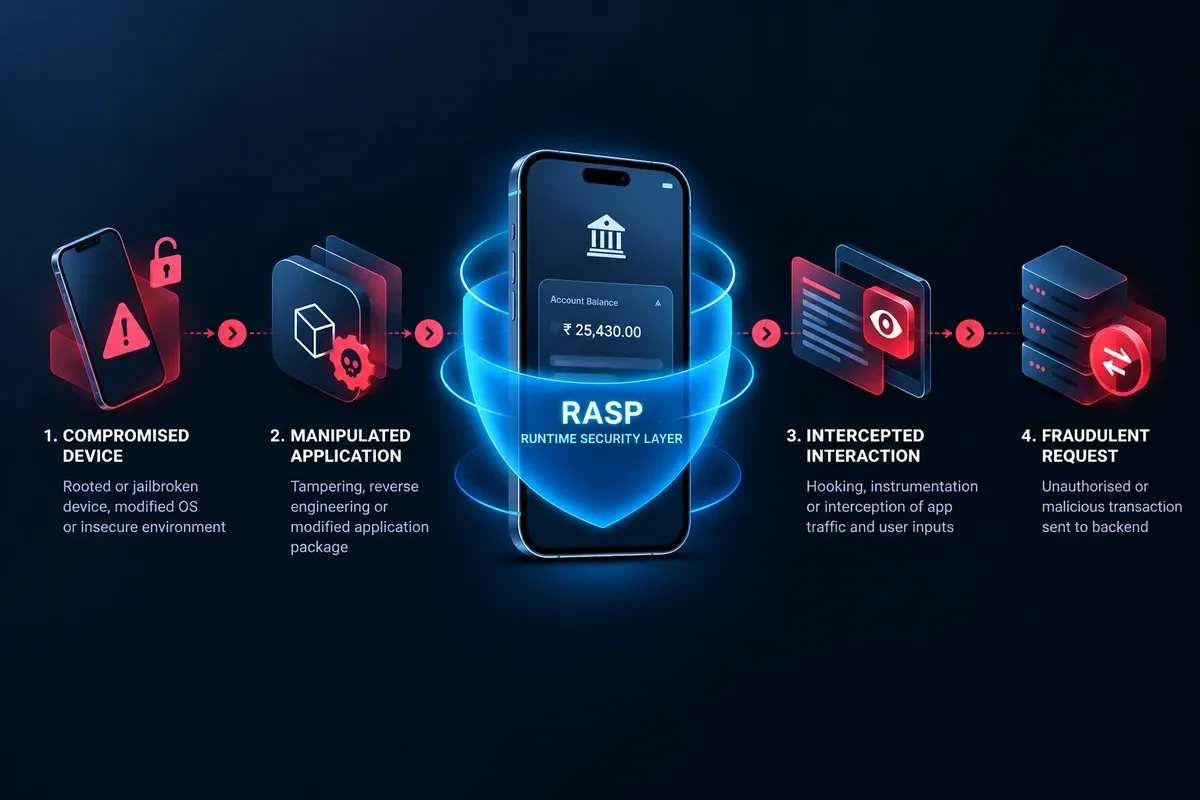
For example:
Compromised device → manipulated application → intercepted interaction → fraudulent request
A runtime security layer can provide signals at multiple points in this chain.
Sign3 RASP is built around this principle: the mobile device becomes part of the application's security perimeter. Its RASP SDK supports Android and iOS, as well as Flutter and React Native, with a documented application footprint of less than 2 MB.
What Are the Benefits of RASP?
RASP helps organizations detect and respond to threats while applications are running. Some of the benefits include:
1. Runtime Visibility
RASP provides visibility into activity while the application is running rather than relying exclusively on pre-release testing or perimeter controls.
2. Runtime Response
Depending on the implementation, RASP can do more than generate an alert. It can trigger a predefined response when a threat is detected.
3. Application-aware Context
Because RASP operates closer to application execution, it can use runtime context to assess suspicious activity.
4. Protection Against Application Tampering
For mobile applications, runtime controls can identify attempts to manipulate the app, attach hooks or execute it in a compromised environment.
5. Flexible Security Policies
Different threats don't necessarily require the same response. A low-confidence signal might simply increase a risk score, while a high-confidence runtime compromise could result in a session being terminated. Our six-level reaction spectrum is designed around this principle.
6. Security-team Visibility
Runtime events can feed dashboards, SIEMs and fraud systems, helping security and fraud teams investigate threats and correlate signals.
What Should You Look for in a RASP Solution?
Not every RASP implementation provides the same capabilities. When evaluating a RASP security solution, consider:
1. Runtime Coverage
Does the solution protect the application during execution rather than only providing pre-release security testing?
2. Threat Coverage
Can it detect the runtime threats relevant to your application and users?
3. Response Controls
Can your team choose between logging, warning, restricting, terminating sessions or other responses?
4. Platform Support
Does the solution support the platforms and frameworks your applications use? For example, Sign3 RASP supports Android, iOS, Flutter and React Native through its SDK approach.
5. Offline Capability
For mobile applications, consider whether protection continues when the device cannot reach your backend. Our runtime checks operate locally and can continue working offline.
6. Integration and Footprint
Security controls need to work within the application's technical and performance constraints. Consider SDK size, integration effort and application architecture.
7. Reporting and Integrations
Look for the ability to send runtime security events to the systems your security and fraud teams already use. We support dashboard visibility and forwarding events to SIEM or fraud engines through webhooks.
How Sign3 RASP Works
Sign3 RASP is designed around a simple principle:
Integrate once. Protect continuously.
Its runtime security workflow consists of five stages:
Integrate → Detect → React → Report → Tune

The SDK is integrated into the application and configured according to the organisation's security requirements. Runtime checks then operate continuously across six protection layers. When a threat is detected, the configured response is triggered. Events are reported to the Sign3 dashboard and can be forwarded to a SIEM or fraud engine. Security teams can then tune policies remotely as threat conditions change.
Six Protection Layers
- Device Environment: Root, jailbreak, emulator and device-security signals.
- App Integrity: Repackaging, cloning, debugging, hooking and memory tampering.
- Screen & Interaction: Screenshots, recording, remote-access tools, overlays and accessibility abuse.
- Malware & Risky Apps: Banking trojans, sideloaded applications and other device-risk signals.
- Network & Secrets: Interception proxies, VPNs, dynamic TLS pinning and runtime secret protection.
- API Attestation: Signals confirming the authenticity of the application and health of the device.
The result is a runtime security layer that moves beyond protecting only the backend and considers the device and application runtime as part of the security perimeter.
Why Runtime Protection Matters
Application security cannot stop at the network perimeter. As applications increasingly run on user-controlled devices and support sensitive workflows, security teams need visibility into what happens during application execution.
RASP adds a runtime security layer that can detect suspicious conditions, understand application and device context and trigger predefined responses while the application is running. For mobile applications, this becomes especially important. There can be security risks that aren't necessarily visible from the backend alone.
Sign3 RASP brings runtime protection directly into Android and iOS applications, with support for Flutter and React Native, six protection layers, local runtime detection and configurable responses from logging through application termination.
FAQs
What does RASP stand for?
RASP stands for Runtime Application Self-Protection. It is an application security technology designed to detect and respond to threats while an application is running.
What is RASP in cybersecurity?
RASP is a runtime application security technology that monitors application execution and runtime conditions to identify suspicious activity and take configured protective actions.
What is a RASP tool used for?
A RASP tool is used to monitor applications during execution, detect runtime threats and respond according to configured security policies. Depending on the implementation, responses can include logging, alerting, restricting functionality, terminating sessions or stopping application execution.
Can RASP protect mobile applications?
Yes. Mobile RASP can provide runtime protection against threats such as device compromise, application tampering, hooking, screen-sharing, risky applications and network interception. Sign3 RASP supports Android and iOS, as well as Flutter and React Native.
Does RASP work offline?
This depends on the RASP implementation. Sign3’s runtime checks operate locally and are designed to work even when the device is offline.
Does RASP replace other application security controls?
RASP should generally be considered part of a broader application security architecture. It can complement controls such as WAFs, API security, secure development practices, application security testing and fraud detection.


